The IGNOU assignment result is an important academic update for students enrolled in Indira Gandhi National Open University. Assignments form an important part of the evaluation process for many IGNOU programmes, and students need to keep track of whether their submitted assignments have been evaluated and whether the marks have been updated in the university’s online system.
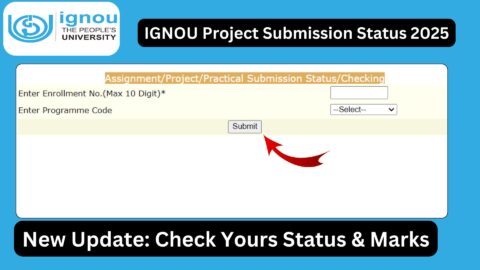
After submitting an assignment, students often want to know whether their assignment has been received, evaluated and whether the marks have been uploaded. The online assignment status facility can help students check the available information using their enrollment details.
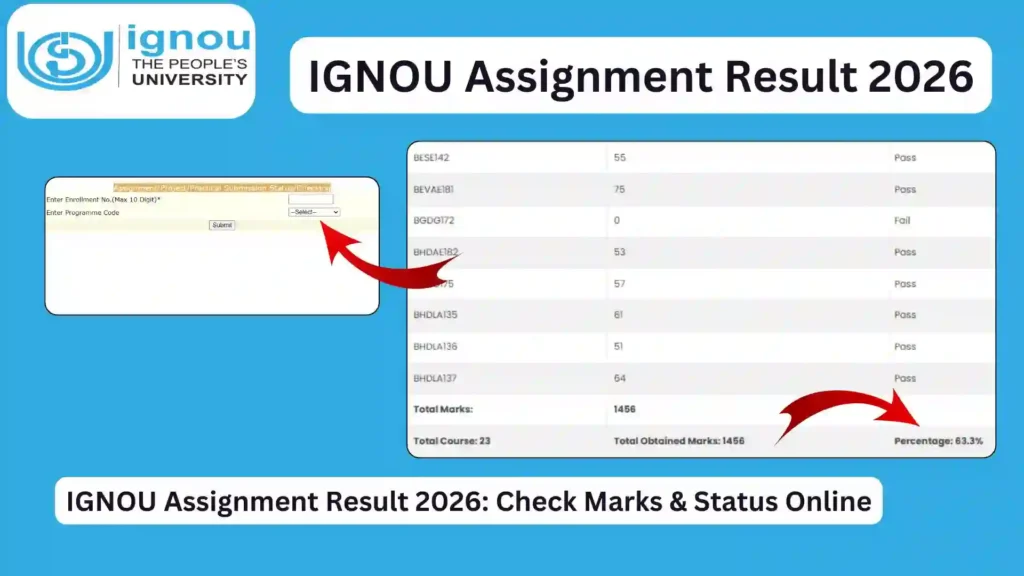
It is advisable for students to keep their enrollment number and other required details ready before visiting the assignment status page.
What Is IGNOU Assignment Result?
The IGNOU assignment result refers to the marks or evaluation status of assignments submitted by students as part of their academic programme.
Assignments are an important component of the IGNOU evaluation system for many programmes. Students are generally required to complete and submit assignments for their registered courses according to the applicable academic schedule.
Once assignments are submitted, they are evaluated by the concerned academic authorities or study centres. After evaluation and processing, the available marks can be updated in the university’s online system.
Students should understand that assignment submission, assignment evaluation and assignment marks updation are different stages. Therefore, the marks may not appear immediately after an assignment has been submitted.
IGNOU Assignment Result Important Links and Information
| Information | Details |
|---|---|
| University | Indira Gandhi National Open University |
| Assignment Result/Status Link | https://isms.ignou.ac.in/changeadmdata/StatusAssignment.asp |
| Mode of Checking | Online |
| Information Required | IGNOU Enrollment Number and other details as requested |
| Academic Component | Assignment |
| Result Type | Assignment marks/status |
| Recommended Action | Check the status periodically after submission |
| Important Document | Assignment submission proof/receipt |
| Final Academic Record | Check the IGNOU grade card for overall course components |
How to Check IGNOU Assignment Result Online?
Students can follow a few simple steps to check their assignment status and available marks.
Step 1: Visit the Assignment Status Page
Open the following link in your browser:
https://isms.ignou.ac.in/changeadmdata/StatusAssignment.asp
This is the page provided for checking assignment-related status.
Step 2: Enter Your Enrollment Number
Enter your IGNOU enrollment number in the required field.
Students should carefully enter the enrollment number because incorrect information may prevent the system from displaying the correct record.
Step 3: Enter Other Required Details
If the page asks for additional information, provide the required details accurately.
Make sure that the information corresponds to your IGNOU student record.
Step 4: Submit the Information
After entering the required details, submit the form.
The system will process the information and display the assignment-related information available for your record.
Step 5: Check Your Assignment Status
Review the displayed information carefully.
Depending on the availability of updated records, you may be able to see information related to submitted assignments and marks.
If marks are not available yet, it does not necessarily mean that your assignment was not submitted successfully.
What Details Can Students Check?
The information available through the assignment status system can vary depending on the student’s programme, course and the latest data uploaded by IGNOU.
Students may be able to check information related to their assignment submission and evaluation.
The assignment record can be particularly useful for determining whether marks have been updated for the courses in which assignments were submitted.
Students should compare the information shown online with their own assignment submission records.
Why Are IGNOU Assignments Important?
Assignments are an important part of the academic evaluation process for many IGNOU programmes.
Students are expected to complete assignments for their registered courses according to the instructions provided by the university.
Assignments allow students to demonstrate their understanding of the course material. They also encourage learners to study their course content regularly rather than depending entirely on the term-end examination.
Because assignments can contribute to the overall course evaluation, students should take their submission deadlines and academic requirements seriously.
When Is the IGNOU Assignment Result Updated?
There is no single fixed time at which every student’s assignment marks appear online.
The process can involve several stages:
- Student prepares the assignment.
- Student submits the assignment.
- Assignment is received by the concerned authority or study centre.
- Assignment is evaluated.
- Marks are processed.
- Marks are uploaded or updated in the online system.
- Students can view the available information.
Because these stages take time, students should not expect their assignment marks to appear immediately after submission.
The time required can also vary between study centres, programmes and academic sessions.
Why Is My IGNOU Assignment Result Not Showing?
One of the most common concerns among students is that their IGNOU assignment result is not showing even though they have submitted their assignment.
There are several possible reasons.
The assignment may still be awaiting evaluation. It is also possible that the assignment has been evaluated but the marks have not yet been uploaded or processed in the online system.
Another possibility is that the student’s assignment information is still being updated.
Students should therefore avoid assuming that the assignment has been rejected simply because the marks are not visible immediately.
If a significant amount of time has passed and the marks remain unavailable, students can contact the appropriate IGNOU study centre or regional centre with their assignment submission proof.
What Should You Do If Assignment Marks Are Missing?
If your IGNOU assignment result is missing, the first step is to remain patient and check whether the marks are updated later.
Students should keep their assignment submission receipt, acknowledgement, screenshot or other proof of submission.
If your assignment was submitted successfully but the marks are not updated after a reasonable period, you can contact the relevant IGNOU authority.
When contacting IGNOU, it can be helpful to provide:
- Enrollment number
- Programme name
- Course code
- Assignment submission date
- Assignment submission proof
- Study centre details
- Screenshot of the current assignment status, if applicable
Providing complete information can make it easier for the concerned authority to understand the issue.
Assignment Result and IGNOU Grade Card
Students should also understand the relationship between the assignment result and the IGNOU grade card.
The assignment result focuses specifically on assignment-related information, while the grade card provides a broader view of academic performance.
Depending on the programme, the grade card can include assignment marks along with term-end examination and other applicable components.
Therefore, students should check both their assignment status and grade card when monitoring their academic progress.
A student may have submitted an assignment successfully while the corresponding grade card entry is still pending because the marks have not yet been processed.
Does Assignment Submission Guarantee Marks?
Submitting an assignment does not automatically mean that the student will receive full marks.
Assignments are evaluated according to the applicable academic requirements. Students should complete assignments properly, follow the prescribed format and answer the questions according to the instructions provided for their programme and course.
Students should also make sure that assignments are submitted within the applicable deadline.
The quality of the submitted work can affect the marks awarded.
How to Prepare for IGNOU Assignment Submission?
Students can avoid many assignment-related problems by preparing their submissions carefully.
First, download or obtain the correct assignment questions for your programme and course.
Next, make sure you are working with the assignment applicable to your academic session.
Write answers according to the instructions provided by IGNOU. Ensure that your enrollment number, programme, course code and other required details are correctly mentioned.
Before submitting, review the complete assignment.
After submission, keep proof that the assignment was successfully submitted.
This proof can be particularly important if the marks do not appear in the IGNOU assignment result later.
Keep Assignment Submission Proof Safe
One of the most useful things students can do is keep their assignment submission records.
Depending on how an assignment was submitted, the proof could include:
- Submission receipt
- Online submission confirmation
- Screenshot
- Email acknowledgement
- Study centre acknowledgement
- Other official submission evidence
Do not delete these records immediately after submission.
Keep them until the assignment marks have been updated and your academic requirements for the relevant course have been completed.
Assignment Result for Different IGNOU Sessions
IGNOU conducts admissions and examinations in different academic cycles, and students can belong to different admission sessions.
As a result, assignment evaluation and marks updation can occur at different times for different students.
When checking your IGNOU assignment result, make sure you are checking information associated with your own enrollment and programme.
Students should not compare their update time directly with another student’s because assignment evaluation and data processing can vary.
What If the Assignment Was Submitted but Not Accepted?
If your assignment was submitted but there is a concern about whether it was accepted, first check the submission proof.
If you have official evidence that the assignment was submitted successfully, retain it carefully.
If the assignment status remains unresolved for a prolonged period, contact the appropriate study centre or regional centre.
Explain the issue clearly and provide your enrollment number, course details and proof of submission.
Can Students Check Assignment Marks Online?
Yes, students can use the assignment status facility to check the available assignment-related information online.
The direct link provided for checking the IGNOU assignment result is:
https://isms.ignou.ac.in/changeadmdata/StatusAssignment.asp
Students should remember that online records are dependent on the latest information processed and uploaded by the university.
If a recently submitted assignment is not yet visible, students may need to wait for the record to be updated.
Common Problems While Checking IGNOU Assignment Result
Incorrect Enrollment Number
Entering an incorrect enrollment number can prevent the system from locating your record.
Always double-check the number before submitting the form.
Marks Not Updated
The assignment may still be under evaluation or processing.
Check again after some time.
Course Not Showing
If a particular course is not visible, verify that the course is correctly registered for your programme and that the relevant assignment was submitted.
Website or Technical Problem
If the page is temporarily unavailable or does not work properly, try again later. You can also check your internet connection and browser.
Assignment Submitted but No Result
Keep your submission proof and contact the relevant IGNOU authority if the issue continues after sufficient processing time.
Tips for Students Checking IGNOU Assignment Result
Students should follow these useful practices:
- Enter your enrollment number carefully.
- Check the correct course information.
- Keep assignment submission proof.
- Do not panic if recently submitted marks are missing.
- Check the status periodically.
- Compare assignment information with your grade card.
- Contact the concerned study centre or regional centre if a prolonged discrepancy remains.
- Keep copies of important academic documents.
FAQ about IGNOU Assignment Result 2026
What is the IGNOU assignment result?
The IGNOU assignment result refers to the assignment-related marks or status available for a student’s registered courses after assignments have been submitted, evaluated and processed.
Where can I check the IGNOU assignment result?
You can check your assignment status using the following link:
https://isms.ignou.ac.in/changeadmdata/StatusAssignment.asp
What details are required to check the assignment result?
Students generally need their IGNOU enrollment number and any other information requested by the assignment status page.
Why is my IGNOU assignment result not showing?
Your assignment may still be awaiting evaluation or the marks may not have been uploaded to the online system yet. Assignment data can take time to be processed.
How long does it take for IGNOU assignment marks to be updated?
There is no single fixed time for every student. The update depends on evaluation and data processing, which can vary according to the programme, course and concerned study centre.
What should I do if my assignment marks are missing?
Keep your assignment submission proof and check the status again after some time. If the marks remain missing for a prolonged period, contact the concerned IGNOU study centre or regional centre.
Does the assignment result appear in the IGNOU grade card?
Assignment marks can be included in the grade card as part of the applicable academic components. Students should check their grade card to monitor their overall course record.
Does submitting an assignment guarantee full marks?
No. Assignment marks depend on the evaluation of the submitted work. Students should follow the prescribed assignment instructions and provide complete and relevant answers.
Can I check my assignment result online?
Yes. Students can check the available assignment-related information online using the IGNOU assignment status page.
What proof should I keep after submitting an assignment?
Students should keep their assignment submission receipt, acknowledgement, screenshot, email confirmation or other official proof, depending on the submission method.
What if my assignment was submitted but the marks are still missing?
Do not immediately assume that your submission failed. Evaluation and data updation can take time. Keep your submission proof and contact the relevant IGNOU authority if the marks remain unavailable for an extended period.
Should I check the assignment result and grade card separately?
Yes. The assignment status page can help you check assignment-related information, while the grade card provides a broader overview of applicable academic components.
Conclusion
The IGNOU assignment result is an important part of tracking academic progress for students whose programmes include assignments as an assessment component. After submitting assignments, students should regularly check the available assignment status and marks through the online system.
Students can check the IGNOU assignment result using the provided link:
https://isms.ignou.ac.in/changeadmdata/StatusAssignment.asp
When checking the result, make sure that your enrollment number and other required details are entered correctly. If marks are not visible immediately after submission, there is generally no need to panic because evaluation and online updation can take time.
Students should always keep their assignment submission proof safely until the marks have been updated and the relevant academic requirements have been completed. If a prolonged discrepancy remains, students can contact their concerned study centre or regional centre with the required details and submission evidence.
It is also useful to check the IGNOU grade card because it provides a broader view of applicable academic components, including assignment and examination-related information.
By regularly monitoring the IGNOU assignment result, maintaining proper submission records and checking the grade card, students can stay informed about their academic progress and identify any missing information at an early stage.